To convert Shared Mailbox(es) to Regular Mailbox(es) in Office 365/Exchange Online I’ve created a script with which we can either can use a CSV file for input or fill in the boxes when the script asks for input. Use a CSV when converting several mailboxes at one time. Use the manual form for 1 mailbox.
When using a CSV-file, it must be saved as “Unicode, Semicolon separated” (;) and must contain the following fields:
| Name | Description |
| Primary email address for the Shared Mailbox | |
| License | Name of the license which will be attached (in the form of “TenantId:AccountSkuId” |
Make sure you fill in the right license in the License field within the CSV and that these licenses are purchased/ available! For example:
| Name | Powershell |
| P1 | tenant:EXCHANGESTANDARD |
| P2 | tenant:EXCHANGEENTERPRISE |
| K | tenant:EXCHANGEDESKLESS |
Script
Here’s the code for the script:
#### Set Variable
Set-Variable -name UsageLocation -value NL
#### Create Function Logon to Office365 - Exchange Online
function Logon {
 #### Pop-up a dialog for username and request your password
 $cred = Get-Credential
 #### Import the Local Microsoft Online PowerShell Module Cmdlets and Connect to O365 Online
 Import-Module MSOnline
 Connect-MsolService -Credential $cred
 #### Establish an Remote PowerShell Session to Exchange Online
 $msoExchangeURL = “https://ps.outlook.com/powershell/”
 $session = New-PSSession -ConfigurationName Microsoft.Exchange -ConnectionUri $msoExchangeURL -Credential $cred -Authentication Basic -AllowRedirection
 Import-PSSession $session
 }

#### Create Function Logoff Office365 & Exchange Online
function Logoff {
 #### Remove the Remote PowerShell Session to Exchange Online ----
 Get-PsSession | Remove-PsSession
 #Remove-PsSession $session
 }

#### Create Function Create Dropbox
Function Select-DropObject ($ObjName, $Object) {
 #Generated Form Function
 function GenerateForm {
 #region Import the Assemblies
 [reflection.assembly]::loadwithpartialname("System.Windows.Forms") | Out-Null
 [reflection.assembly]::loadwithpartialname("System.Drawing") | Out-Null
 #endregion
 #region Generated Form Objects
 $form1 = New-Object System.Windows.Forms.Form
 $button1 = New-Object System.Windows.Forms.Button
 $label1 = New-Object System.Windows.Forms.Label
 $comboBox1 = New-Object System.Windows.Forms.ComboBox
 $InitialFormWindowState = New-Object System.Windows.Forms.FormWindowState
 #endregion Generated Form Objects

#----------------------------------------------
 #Generated Event Script Blocks
 #----------------------------------------------
 #Provide Custom Code for events specified in PrimalForms.
 $button1_OnClick=
 {
 $global:SelObj = $comboBox1.SelectedItem
 $form1.close()
 }
 $handler_label2_Click=
 {
 }
 $OnLoadForm_StateCorrection=
 {#Correct the initial state of the form to prevent the .Net maximized form issue
 $form1.WindowState = $InitialFormWindowState
 $Object | Foreach {
 $comboBox1.items.add($_)
 $comboBox1.SelectedIndex=0
 }
 $Combobox1.visible = $true
 $label1.visible = $true
 $button1.visible = $true
 $form1.Text = "Please select a $ObjName"
 }
 #----------------------------------------------
 #region Generated Form Code
 $form1.AutoScaleMode = 0
 $form1.Text = "Please wait loading $ObjName...."
 $form1.Name = "form1"
 $form1.DataBindings.DefaultDataSourceUpdateMode = 0
 $System_Drawing_Size = New-Object System.Drawing.Size
 $System_Drawing_Size.Height = 66
 $System_Drawing_Size.Width = 392
 $form1.ClientSize = $System_Drawing_Size
 $form1.FormBorderStyle = 1
 $form1.Controls.Add($InfoLabel)
 $button1.TabIndex = 2
 $System_Drawing_Size = New-Object System.Drawing.Size
 $System_Drawing_Size.Height = 23
 $System_Drawing_Size.Width = 75
 $button1.Size = $System_Drawing_Size
 $button1.Name = "button1"
 $button1.UseVisualStyleBackColor = $True
 $button1.Visible = $False
 $button1.Text = "OK"
 $System_Drawing_Point = New-Object System.Drawing.Point
 $System_Drawing_Point.X = 300
 $System_Drawing_Point.Y = 21
 $button1.Location = $System_Drawing_Point
 $button1.DataBindings.DefaultDataSourceUpdateMode = 0
 $button1.add_Click($button1_OnClick)
 $form1.Controls.Add($button1)
 $label1.TabIndex = 1
 $label1.Font = New-Object System.Drawing.Font("Microsoft Sans Serif",8.25,1,3,1)
 $System_Drawing_Size = New-Object System.Drawing.Size
 $System_Drawing_Size.Height = 23
 $System_Drawing_Size.Width = 50
 $label1.Size = $System_Drawing_Size
 $label1.Name = "label1"
 $label1.Visible = $False
 $label1.Text = "$ObjName:"
 $System_Drawing_Point = New-Object System.Drawing.Point
 $System_Drawing_Point.X = 8
 $System_Drawing_Point.Y = 26
 $label1.Location = $System_Drawing_Point
 $label1.DataBindings.DefaultDataSourceUpdateMode = 0
 $form1.Controls.Add($label1)
 $System_Drawing_Point = New-Object System.Drawing.Point
 $System_Drawing_Point.X = 64
 $System_Drawing_Point.Y = 21
 $comboBox1.Location = $System_Drawing_Point
 $comboBox1.Visible = $False
 $comboBox1.DataBindings.DefaultDataSourceUpdateMode = 0
 $comboBox1.FormattingEnabled = $True
 $comboBox1.Name = "comboBox1"
 $comboBox1.TabIndex = 0
 $System_Drawing_Size = New-Object System.Drawing.Size
 $System_Drawing_Size.Height = 21
 $System_Drawing_Size.Width = 217
 $comboBox1.Size = $System_Drawing_Size
 $form1.Controls.Add($comboBox1)
 #endregion Generated Form Code
 #Save the initial state of the form
 $InitialFormWindowState = $form1.WindowState
 #Init the OnLoad event to correct the initial state of the form
 $form1.add_Load($OnLoadForm_StateCorrection)
 #Show the Form
 $form1.StartPosition = "CenterScreen"
 $form1.ShowDialog()| Out-Null
 } #End Function
 #Call the Function
 GenerateForm
 }


############################################################################################################################
############################################################################################################################

#### Logon to Office 365 & Exchange Online
Logon
#### Ask the user for input Use CSV?
[void][System.Reflection.Assembly]::LoadWithPartialName('Microsoft.VisualBasic')
$result = [Microsoft.VisualBasic.Interaction]::MsgBox(`
"Do you want to convert using a CSV file?", 'YesNoCancel,Question', "Respond please")

switch ($result) {
 'Yes' {
 #### Give CSV Name
 #$file = [Microsoft.VisualBasic.Interaction]::InputBox("Enter CSV File including full path", "CSV File", "")
 [void] [System.Reflection.Assembly]::LoadWithPartialName("System.Windows.Forms")
 $ofd = New-Object System.Windows.Forms.OpenFileDialog
 #$ofd.InitialDirectory = "d:\scripts"
 $ofd.ShowHelp=$true
 if($ofd.ShowDialog() -eq "OK") { $ofd.FileName }
 $File = $ofd.Filename
 Write-Host $File

 #### Create Log File + Start Logging
 if ($File) {
 $Log = $File + ".log"
 $ErrorActionPreference="SilentlyContinue"
 Stop-Transcript | out-null
 $ErrorActionPreference = "Continue"
 Start-Transcript -path $Log -append
 }

 #### Convert Shared Mailbox
 Import-csv -Delimiter ";" $File | ForEach {
 Set-MsolUser -UserPrincipalName $_."Email" -UsageLocation $UsageLocation
 Set-MsolUserLicense -UserPrincipalName $_."Email" -AddLicenses $_."License"
 Set-Mailbox $_."Email" -Type Regular -ProhibitSendReceiveQuota 25GB -ProhibitSendQuota 24.75GB -IssueWarningQuota 24.5GB
 }

#### Stop Logging
 Stop-Transcript

 }

'No' {

#### Create Log File + Start Logging
 $Log = "ConvertSharedMailboxToRegular.ps1.log"
 $ErrorActionPreference="SilentlyContinue"
 Stop-Transcript | out-null
 $ErrorActionPreference = "Continue"
 Start-Transcript -path $Log -append

#### Ask for selecting UserPrincipalName
 #$Name = [Microsoft.VisualBasic.Interaction]::InputBox("Enter the User Princicpal Name (primary mail address)", "UPN", "")
 Write-Host "Please wait while the list of mailboxes is being generated!" -BackgroundColor DarkGreen -ForegroundColor White
 Select-DropObject "Mailbox" (Get-Mailbox -ResultSize Unlimited | Where { $_.RecipientTypeDetails -eq 'SharedMailbox' } | Sort -property UserPrincipalName | Select @{Name = "Name"; Expression = {$_.UserPrincipalName}} | Foreach-Object {$_ -replace "@{Name=", ""} | Foreach-Object {$_ -replace "}", ""} )
 $Name = $SelObj

 #### Select License
 # Send the Licenses to the License function
 Select-DropObject "License" (Get-MsolAccountSku | Select @{Name = "License"; Expression = {$_.AccountSkuId}}| Foreach-Object {$_ -replace "@{License=", ""} | Foreach-Object {$_ -replace "}", ""})
 $License = $SelObj

 #### Convert Shared Mailbox
 Set-MsolUser -UserPrincipalName $Name -UsageLocation $UsageLocation
 Set-MsolUserLicense -UserPrincipalName $Name -AddLicenses $License
 Set-Mailbox $Name -Type Regular -ProhibitSendReceiveQuota 25GB -ProhibitSendQuota 24.75GB -IssueWarningQuota 24.5GB

#### Stop Logging
 Stop-Transcript

}


 'Cancel' { "The process is cancelled" }
}

#### Logoff
Logoff
Copy and paste the code in notepad (for example) and save it as “ConvertSharedMailboxToRegular.ps1”. Go through the following steps to use the script.
Steps
- Make sure you have the following tools installed before running the script:
Microsoft Online Services Sign-In Assistant (IDCRL7) – 32 bit version
Microsoft Online Services Sign-In Assistant (IDCRL7) – 64 bit version
Microsoft Online Services Module for Windows PowerShell (32-bit version)
Microsoft Online Services Module for Windows PowerShell (64-bit version)
See: http://onlinehelp.microsoft.com/Office365-enterprises/ff652560.aspx - Run the “ConvertSharedMailboxToRegular.ps1” script from this window.
- You will be asked to logon to Office 365. Use you an Administrator account for this login.
- Next you will be given the choice to use a CSV.

- When you choose Yes, you will be asked to choose the CSV file.
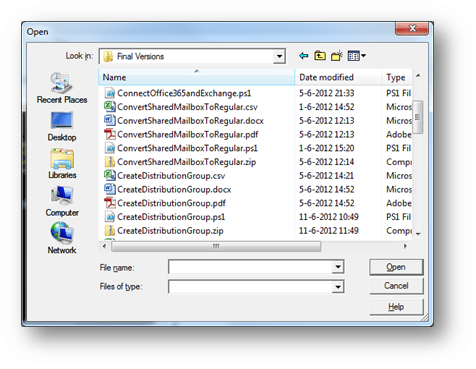
- Browse to the appropriate CSV file and choose Open.
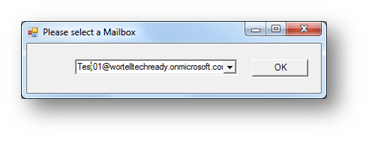
- When you choose No,
a list of all the shared mailboxes within the environment will be generated (this can take some time depending on the size of the environment). - Pick the right mailbox from the list and click OK.
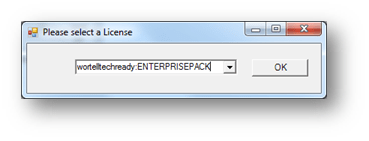
- Select the right license from the next box:
- A log file will be created with the CSV file name or script name and is given the extension.log.

This is part 3 of a series of posts about some PowerShell scripts I created or used and modified for some Office 365/Exchange Online migrations.
In part 4 of this series I will share a script which can be used to create Distribution Groups.
An overview of the series can be found here.
 Michel van Vliet - IT Blog
Leave a comment